Newsletters For Law Firms: Top Tactics To Captivate New Clients
Barsha Bhattacharya, 5 hours ago
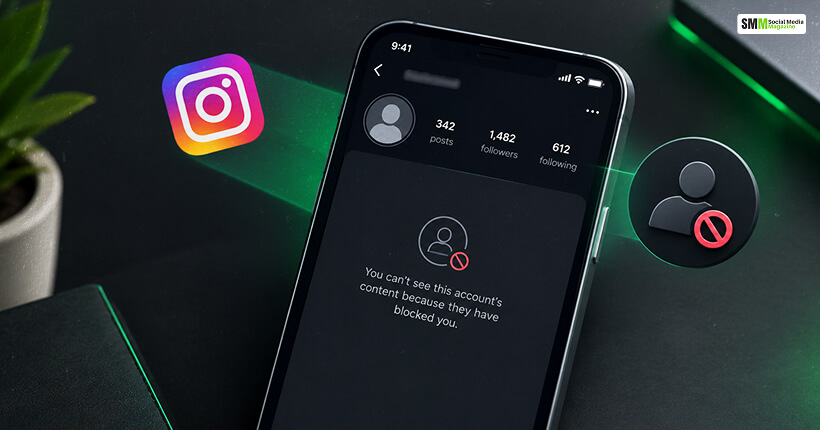
It does not matter whether you are managing instagram accounts for brands and creators or taking care of your chaotic personal feed.
You must have asked or encountered the question of “how to see who blocked you on instagram” more than once.
The question is simple, but the answer is annoying.
Instagram will never tell you when someone blocks you. There will be no banner, no notification, or no little icon pop-up.
So, the entire blocking system in Instagram is silent, making it obvious that the confirmation we expect will never come.
As a professional and also as a user, I rely on some behavioral signs.
I have talked about these signs in this guide and how I check who has blocked me.
Furthermore, I will talk about what Instagram’s own leadership has said about the philosophy behind blocking.
Also, I am going to be direct about the “who blocked me” apps flooding app stores right now, because most of them are not worth the risk.
No, Instagram does not notify you when someone blocks you.
There will be no email, notification, or in-app alert. The app also does not have any official feature on desktop or in the application to list who has blocked you.
However, this absence of a blocking notification is not an oversight. It is a carefully designed measure.
Meta treats blocking as a safety and privacy tool first, and a social one second.
If Instagram alerted you every time you were blocked, it would turn a private safety decision into a confrontation.
It is exactly the opposite of what the feature is meant to do.
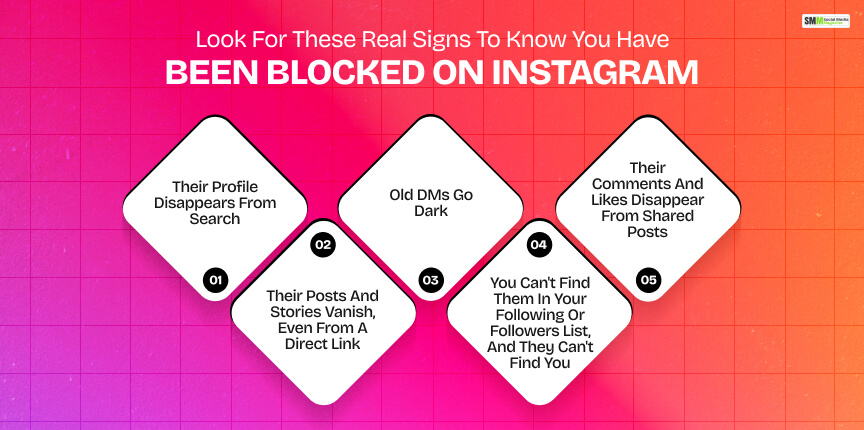
I have to confirm a block for a client, usually when a brand partner or collaborator has gone silent.
I follow this order to see who has blocked the client page on Instagram.
Search their exact username.
If an account you have interacted with regularly simply does not appear in search results anymore, that is the first flag.
However, on its own, this could also mean they deactivated their account or changed their username.
So, I never stop here.
I click on an old link to their profile.
It can be a comment thread or a tagged photo.
If I land on a blank grid with no bio, no profile photo, and a disabled Follow button, I know that the user has blocked my client’s account.
Instagram shows this “ghost profile” state specifically to accounts that have been blocked by the profile owner.
You can open your existing message thread with them.
Do you see a generic gray silhouette in their name or photo, and tapping their name produces an error or a blank page?
Then you are very likely blocked.
Your message history usually stays intact.
However, you can no longer send anything new, and nothing you do send will be delivered.
Has an account you follow suddenly disappeared from your following list?
Also, can you find your own account from the other account?
If the answers are YES and NO, it is a strong combined signal to confirm the blocking.
Instagram removes mutual visibility from both directions when a block happens.
You both had commented on the same public post before.
Now, you cannot see their comment. This is a clear indication of a block.
However, this is not always a reliable sign. There can be instances of deleted or moderated comments.
This is the part people get wrong most often.
A blank profile does not automatically mean a block.
It could just as well mean the account went private, was deactivated, or restricted you instead.
Here is how I distinguish between them.
| Scenario | Profile Shows up in Search | Old DMs | Profile Page | Follow Button |
|---|---|---|---|---|
| Blocked You | No | Grayed-out Contact Can’t Open | Blank, “No Posts” or unavailable | Disabled or Missing |
| Went Private | Yes | Unaffected | Bio and Photo Visible Posts Hidden | “Follow” (Requires Approval) |
| Deactivated Account | No | Often Shows “Instagram User” | “Sorry, This Page isn’t Available” | Missing |
| Restricted you | Yes | Appears normal to you | Fully Visible | Normal You Likely Won’t Notice |
That last row is worth pausing on.
Restricting a profile is different from a block, and understanding the difference is genuinely useful.
This brings me to what Instagram’s leadership has actually said about it.
Adam Mosseri has led Instagram since 2018.
He has talked about blocking mostly in the context of why Instagram has built an alternative to it in the form of restructuring a profile.
Instagram introduced the “Restrict” feature in October 2019. Then, Mosseri explained why the feature came into place.
He said that the team had been listening to younger users who felt blocking was too blunt an instrument for everyday conflict.
He also said the company had heard from young people in its community that they were reluctant to block, unfollow, or report someone who was bothering them.
Doing so could escalate the situation, particularly when they had to keep seeing that person in real life.
Mosseri expanded on this in an interview with NPR, noting that a lot of harmful behavior on the platform happens between people who already know each other offline.
The tools Instagram had before, meaning block, mute, and report, were insufficient for that specific, more socially complicated situation.
He also pointed out a tradeoff that most users never think about.
Blocking someone makes you invisible to them, but it also makes them invisible to you.
It can be a problem if you actually want to keep an eye on what they are posting or saying.
That tradeoff is the core logic behind why Instagram still does not tell you who has blocked you.
From Meta’s perspective, a block is meant to be a clean, one-way exit and not the start of a new conversation.
Instagram further expanded its “Restrict” feature in 2024.
Here, I am quoting the update on 30th May 2024 from the official Instagram blog,
“We’re expanding Restrict to limit even more unwanted interactions.
Now, when you Restrict someone, it will also prevent them from tagging or mentioning you in their posts, or remixing your Reels.”
My blunt answer is a “NO.”
Instagram does not expose blocking data through any API.
So, any website or app claiming to reveal a list of accounts is not trustworthy.
Also, there is a consistent pattern with these apps.
They will ask you to log in with your real Instagram username and password to “scan” your account.
Once you do so, you give a third-party app full access to your account.
The app or website can access your DMs and contacts, and it has the ability to post as you.
There have been instances when some of my clients have used these apps. These apps have changed the password and locked the account holder out of it.
This mirrors a broader pattern the Better Business Bureau has warned about with Instagram-related phishing scams.
In this, compromised accounts are used to message a victim’s own followers and spread the scam further.
If an app or browser extension promises to show you a blocklist, treat that promise itself as the red flag.
Instagram does not sell or expose that data to anyone.
So, any tool claiming to have it either doesn’t work as advertised or is harvesting your credentials.
Above all, in my experience, the risk-to-reward ratio of using a third-party to access a “block list on Instagram” is terrible.
Blocking is not just a petty social move.
For many users, especially for women, it is a safety response.
Pew Research Center’s most recent deep-dive into this behavior found that a substantial share of U.S. adults have dealt with harassment online.
The worst part is that more severe forms of it have been trending upward.
| Metric | Figure | Source |
|---|---|---|
| U.S. adults who have personally experienced online harassment | 41% | Pew Research Center, “The State of Online Harassment.” |
| Adults reporting severe harassment (physical threats, stalking, sexual harassment, sustained harassment) | 25%, up from 18% in 2017 | Pew Research Center |
| LGB adults who have faced online abuse | About 7 in 10 | Pew Research Center |
| Straight adults who have faced online abuse | About 4 in 10 | Pew Research Center |
I include this because it reframes the whole topic.
When someone blocks you, it is easy to take personally, and sometimes it is personal.
However, blocking is also one of the only low-effort and immediate safety actions you can take as a user.
Also, the data I have just presented shows that a meaningful share of the population is reaching for exactly that tool for legitimate reasons.
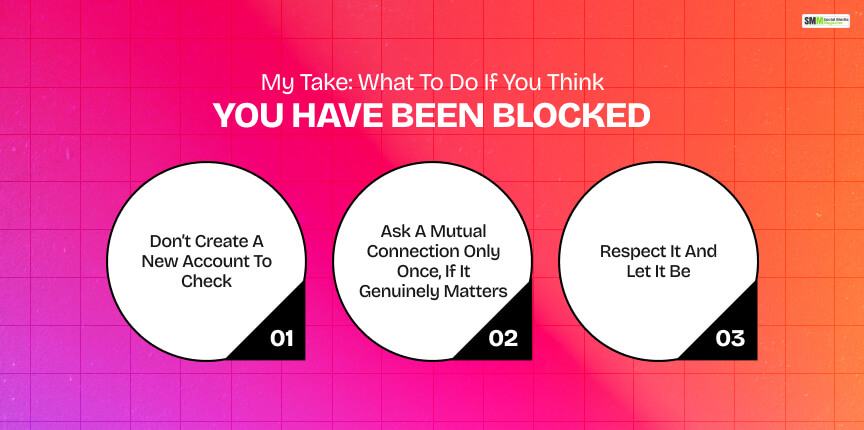
Suppose you have checked all the signs above and are confident that it is a real block.
Here is what I recommend as a social media professional or just as a user.
Once I have checked the signs above and I am reasonably confident it is a real block, here is what I actually recommend.
It confirms nothing you don’t already know.
Repeatedly circling back to check on someone who has blocked you can tip into behavior Instagram.
Also, the other person can read this as harassment.
For business relationships (a brand partner going quiet mid-campaign, for example), a neutral, low-drama check-in from a colleague is reasonable.
For personal relationships, I would skip this entirely.
Now, it is an actual block.
You can try to work around it with new accounts, mutual friends’ devices, and browser tricks.
However, everything you do now will make things worse.
Also, to be honest, the blocking feature is there exactly to prevent this kind of activity.
There is nothing wrong if you want to know how to see who blocked you on instagram.
Also, it is fine to check the public-facing signs I have discussed to confirm a block.
However, what is not right is to check the account that has blocked you through new accounts or through the accounts/devices of your mutual friends.
You are indulging in obsessive behavior and unhealthy stalking.
Also, do not use unauthorized third-party tools that require your login credentials to scan and find the blocklist you want so badly.
Using these third-party tools leads to the violation of Instagram’s Terms of Use and puts your account at real risk of compromise.

Sibashree has been into SEO and eCommerce content writing for more than 9 years. She loves reading books and is a huge fan of those over-the-top period dramas. Her favorite niches are fashion, lifestyle, beauty, traveling, relationships, women's interests, and movies. The strength of her writing lies in thorough research backing and an understanding of readers’ pain points.