Creator Vs Business Account Instagram: The Ultimate 2026 Strategic Blueprint
sibashree bhattacharya, 4 hours ago
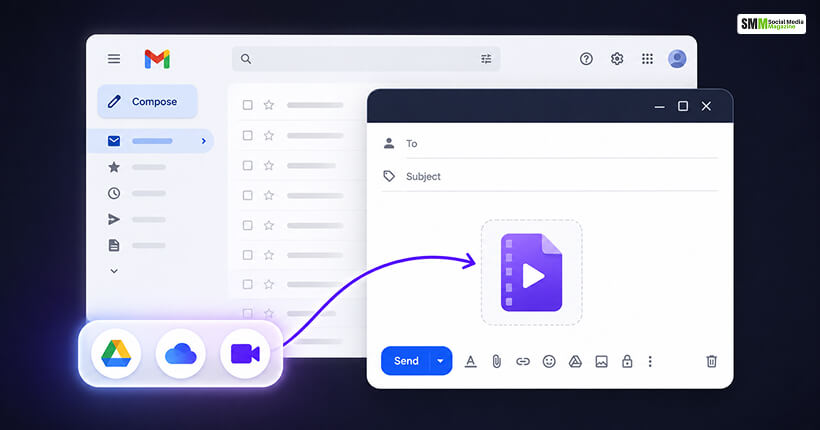
I have sent hundreds of video files over email in the past decade.
And I still see people hit the same wall almost every week about how to send a video through email.
They attach a file, hit send, and either get an instant rejection or a confusing bounce message hours later.
Video is the one file type email was never really built for, and the size limits catch people off guard even when they’ve done this a hundred times.
This is the exact workflow I use, plus the size limits, formats, and troubleshooting fixes that actually matter in 2026.
Yes, you can send video through email.
It is still one of the easiest ways to get a clip in front of a client, coworker, or customer for something like a campaign review.
The catch is that video files are often large, and every major email provider caps the size of what you can attach.
If you are attaching a video file over that cap, the file will either bounce back or the provider will swap it for a cloud link.
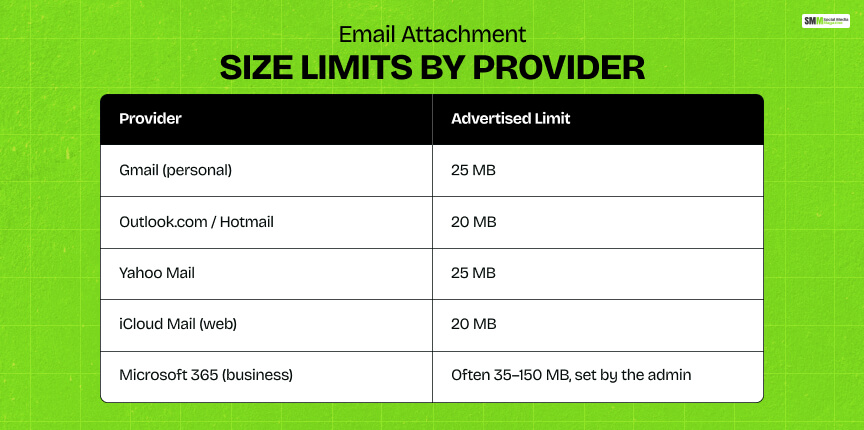
Before picking a method, knowing the attachment file size helps to understand exactly what you are working with. Here is where the major providers stand right now.
| Provider | Advertised Limit | What Happens Over the Limit |
|---|---|---|
| Gmail (personal) | 25 MB | Gmail automatically converts the file to a Google Drive link and inserts that instead. |
| Outlook.com / Hotmail | 20 MB | Message is typically rejected outright with a bounce notice. |
| Yahoo Mail | 25 MB | Message is rejected, and it suggests an alternative sharing method. |
| iCloud Mail (web) | 20 MB | Rejected via standard SMTP, though Apple’s Mail Drop can carry files up to 5 GB with a 30-day link expiry. |
| Microsoft 365 (business) | Often 35–150 MB, set by the admin | Varies by organization. Many IT teams cap it lower than the platform maximum. |
A detail I did not understand for years is that these limits apply to the whole message, not just the visible file.
Attachments are base64-encoded for transit, which inflates the real file size by roughly a third.
So an 18 MB video can quietly become a 24 MB message and clip a 25 MB cap you thought you had room under.
My rule of thumb now is to treat “20 MB” as the safe universal ceiling regardless of what any single provider advertises, and to send a link instead of an attachment for anything bigger.
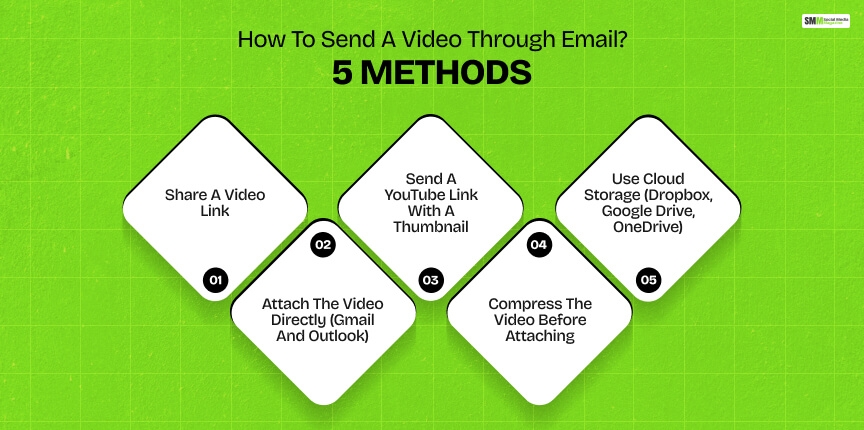
Here are the five approaches I actually use, depending on file size, audience, and how “official” the email needs to look.
This is my default for anything client-facing, because it sidesteps size limits entirely and lets me swap the video later without resending an email.
You can generate a shareable link once your video is uploaded using the following hosting tools.
When the link is generated, you can copy and paste it into the body of a new email. Then, write your message and send.
When the recipient clicks it, the video plays from wherever it is hosted instead of downloading anything to their inbox.
This is the simplest option, but only when the file is genuinely small. It is good for a 30-second clip, not a full walkthrough video.
If you are using Gmail, click “Compose,” then click the paperclip icon for attachment, and then select your file.
In Gmail, you can attach videos up to 25 MB, and beyond that size, it will redirect to Drive automatically.
On the other hand, in Outlook, you will choose “New Email,” then click the paperclip option or “Attach File,” and select your video.
Outlook.com caps direct attachments at 20 MB.
Either way, finish your subject line and message, then hit send.
Always double-check the recipient’s provider too, since the smaller of the two limits, yours or theirs, is the one that actually applies.
Straight video attachments get flagged as spam more often than you would expect.
So for anything going to a larger list or an unfamiliar inbox, I will embed a clickable thumbnail instead of a bare link. It reads as more intentional and gets more clicks.
Upload the video to YouTube, download the auto-generated thumbnail (or grab a screenshot), and upload that image into your email as an inline graphic.
Hyperlink the image to the video’s YouTube URL. Then send a test to yourself first to confirm the thumbnail actually opens the right video before it goes out to anyone else.
When the file needs to stay an attachment because some approval workflows require it, compression is the move.
Reducing resolution or bitrate shrinks the file size without a quality hit anyone will notice on a laptop or phone screen.
Import your video into a compression tool.
Then, resize it down to 720p and export as MP4. It is the most broadly compatible format across devices and email clients.
Once it is under your target size, attach it as normal.
For big files, full-length event recordings, and raw footage for a team review, cloud storage is the most dependable option. It avoids size limits altogether.
Upload the file to whichever service you use. Then, adjust the sharing settings so the intended recipient can actually open it.
Generate a shareable link, copy it, and paste it into your email along with a short note about what they are looking at.
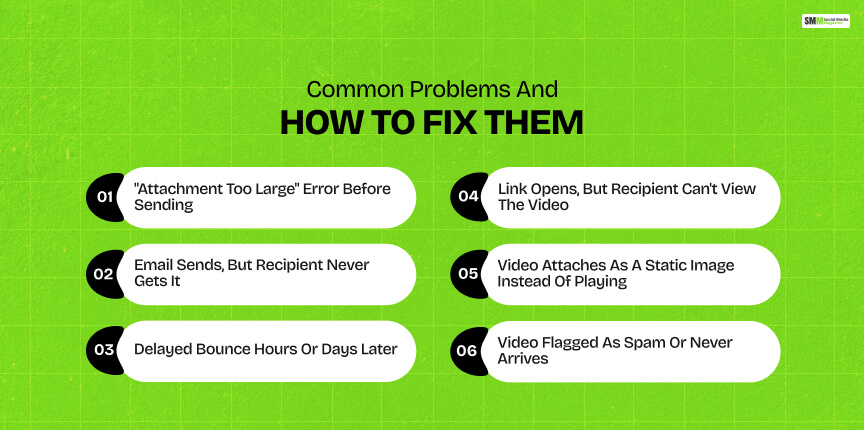
I have either run into these myself or talked a client through them mid-panic before a deadline. This is the troubleshooting table I keep bookmarked.
| Problem | Likely Cause | Fix |
|---|---|---|
| “Attachment too large” error before sending | File exceeds your own provider’s cap | Compress the video or switch to a link-based method. |
| Email sends, but recipient never gets it | Message exceeded the recipient’s limit, not yours | Resend as a link, and the smaller of the two providers’ limits always wins. |
| Delayed bounce hours or days later | Receiving server rejected a message your own server initially accepted | Don’t assume delivery. Confirm receipt for anything time-sensitive |
| Link opens, but recipient can’t view the video | Cloud storage sharing set to private or restricted | Set sharing to “anyone with the link” (or add the recipient directly) |
| Video attaches as a static image instead of playing | Some email clients render video attachments as a thumbnail, not an embedded player | Use a link instead of a raw video attachment. This is standard behavior, not a bug. |
| Video flagged as spam or never arrives. | Large attachments and unusual file types are treated cautiously by spam filters. | Send a link or a YouTube thumbnail instead of a direct video attachment. |
I have learned the third point the hard way.
A sender’s outgoing server can accept a large file. However, they can find out later that the recipient’s server won’t take it.
So the confirmation you see on your end isn’t a guarantee of delivery. For anything with a deadline attached, I follow up separately to confirm the file actually landed.
Email was built for text, and video is still an awkward guest in that format.
Default to links for anything beyond a quick clip if you do not want to struggle about how to send a video through email.
Reserve direct attachments for the truly small stuff.
Once you know the real limits, not just the advertised ones, and have a compression or link-sharing step built into your routine, sending video by email stops being a gamble and just becomes another five-minute task before you hit send.

Sibashree has been into SEO and eCommerce content writing for more than 9 years. She loves reading books and is a huge fan of those over-the-top period dramas. Her favorite niches are fashion, lifestyle, beauty, traveling, relationships, women's interests, and movies. The strength of her writing lies in thorough research backing and an understanding of readers’ pain points.

sibashree bhattacharya, 4 hours ago

sibashree bhattacharya, 22 hours ago