
TikTok Aspect Ratio: The Ultimate Blueprint for Viral Formatting
sibashree bhattacharya, 1 hour ago
Imagine spending hours scripting, filming, and editing a video. However, you only witness its views being flatlined immediately upon release.
Moreover, you check your uploaded clip on the mobile app. Instead, you end up finding the top of your head chopped off by navigation tabs.
An even worse situation is when your critical text captions are completely buried underneath the comment and share buttons on the right side of the screen.
When your framing and positioning fail, your audience engagement dies instantly.
In addition, the algorithm actively penalizes poorly formatted multimedia files because they ruin the native user experience. Mastering the correct TikTok aspect ratio is the absolute easiest way to give your content an instant competitive edge on the For You Page (FYP).
The golden standard for short-form video hosting platforms is a strict vertical layout. Moreover, it is mathematically optimized to fill modern smartphone displays seamlessly from top to bottom.
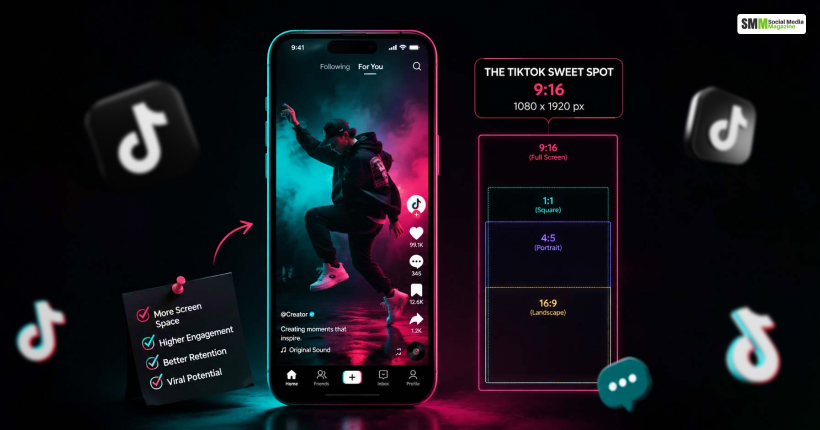
The absolute best TikTok aspect ratio for your standard organic video is 9:16.
This specific framing ensures that your visual storytelling feels entirely native to the mobile environment.
Moreover, it actively prevents awkward presentation mistakes that cause viewers to instinctively swipe away within the first microsecond.
Aspect ratios represent proportional dimensions. However, you still need concrete pixel numbers to configure your camera settings or post-production editing timeline.
In order to perfectly match the 9:16 TikTok aspect ratio, you should always build your digital video files at a standard resolution of 1080 x 1920 pixels.
While you can technically upload square videos or raw landscape clips, the resulting quality drop will be jarring for the end-user.
Anything lower than these pixel configurations looks highly unprofessional or modern high-definition smartphone displays.
Many immediate creators select the correct TikTok aspect ratio inside their editing timeline. However, they still end with a messy and unwatchable video posty-upload.
This happens because they completely fail to account for the platform’s busy user interface (UI) graphics that overlay the screen.
Moreover, the right side of the viewport permanently holds the profile icon, likes, comments, bookmarks and sharing tools.
Meanwhile, the lower fifth of the screen is heavily crowded by the user’s handle, description captions and the rotating audio track banner.
In case you place essential visual elements or text overlays in these areas, they get buried entirely.
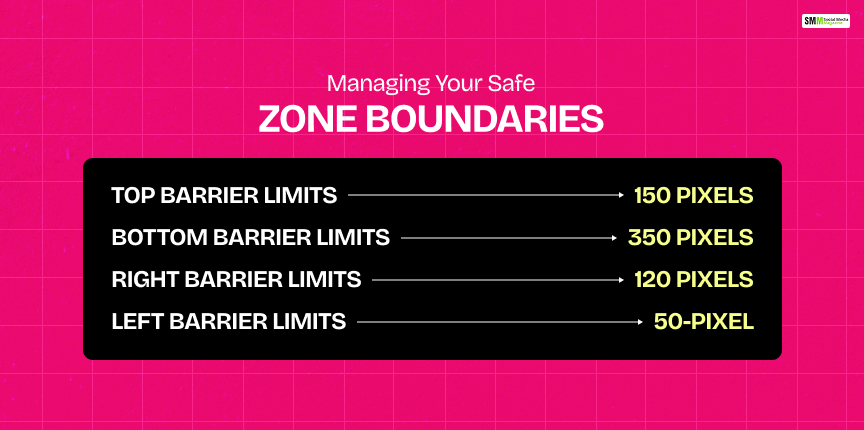
To ensure your critical elements remain perfectly visible across all mobile device models, you need to map out a clear screen perimeter strategy before editing.
Leave the top 150 pixels entirely empty. Consequently, this will help in clearing the app’s native navigation tabs as well as variable phone camera notches.
Keep the bottom 350 pixels free of crucial information to avoid getting covered by captions, usernames and hashtags.
In order to keep visual elements clear of the standard interaction icons, avoid placing focal points in the rightmost 120 pixels.
Maintain a clean 50-pixel buffer on the left edge so your primary text elements never hit the absolute screen border.
When figuring your project files inside software applications such as CapCut, Adobe Premiere Pro or Final Cut Pro, aim for these comprehensive industry benchmarks to guarantee pristine playback.
| Technical Specification | Optimal Target | Acceptable Baseline |
|---|---|---|
| TikTok Aspect Ratio | 9:16 (Vertical Format) | 1:1 (Square Layout) |
| Pixel Resolution | 1080 x 1920 Pixels | 720 x 1280 Pixels |
| File Containers | .MP4 Format | .MOV Format |
| Audio Configuration | AAC Stereo (320kbps) | AAC Stereo (192kbps) |
| Video Compression Codec | H.264 Standard | HEVC / H.265 Standard |
| Target Frame Rate | 30 FPS or 60 FPS | 24 FPS (Cinematic Style) |
If you record cinematic landscape content on a transitional mirrorless camera, you face a major formatting problem when moving to mobile platforms.
Therefore, you must manually adapt that wide-angle footage into a vertical TikTok aspect ratio canvas without making it look like a sloppy afterthought to your audience.
Scale your wide 16:9 clip up inside your editing sequence until it completely fills the vertical canvas margins.
This maintains a highly immersive experience. However, it permanently trims away the outer edges of your original framing.
Place your landscape video directly in the center of the vertical frame. As a result, a blank space is left below and above.
Duplicate the exact asset, blow it up to fill the empty background completely, and apply a heavy blur filter to mask the remaining space.
Stack two or three distinct horizontal clips directly on top of each other within the vertical timeline.
This specific layout format works incredibly well for commentary channels, gaming setups, or even dynamic split-screen storytelling.
Understanding the fundamental TikTok aspect ratio rules is just step one of the optimization process. Additionally, you must also know how to keep your image quality razor-sharp.
That is after the app’s compression engine processes your file.
One thing you need to always remember is not to upload raw 4k video files directly from your smartphone’s camera roll to the application.
The platform’s processing engine will aggressively crush the massive file size to save server bandwidth. As a result, this leaves your final video highly pixelated.
Instead, record your footage in 4K resolution and scale it down to a 9:16 aspect ratio in post-production. Following this, proceed to export it as a clean 1080p file before uploading.
Before tapping the final post button inside the mobile app interface, scroll down to the bottom of the sharing page. Then, enter the deep settings menu.
Ensure the “Allow high-quality uploads” switch is permanently turned on. Otherwise, the app will compress your clip to a lower standard definition by default.

In case your content looks strange or displays post-upload incorrectly, use this quick diagnostic checklist to isolate the root technical cause immediately.
This jarring visual distortion occurs when your active project settings mismatch your source media properties.
Also, always ensure your video editing software pixel aspect ratio is locked onto “Square Pixels (1.0)” instead of anamorphic project options.
If your final exported canvas size is even slightly off-target (such as 1080 x 1900 instead of 1080 x 1920), the app automatically injects thin black bars to fill the blank spots.
Furthermore, double-check your specific sequence timeline settings before running your final export.
If you are ready to adjust your software layout right now, follow these direct, platform-specific walkthrough steps to build a reusable creator template.
Failing to respect the proper TikTok aspect ratio signals to your viewers that you cut major corners on your overall production value.
When your layout is clean, your graphic assets are placed safely, and your rendering resolution is perfectly crisp, your audience will naturally watch your loops longer.
Additionally, higher audience retention metrics tell the algorithm to push your content out to the thousands of new feeds.
Moreover, stop letting framing parameters ruin your creative hard work.
Besides this, set up your software templates, respect your safe zones and start publishing pristine vertical content today.

Sibashree has been into SEO and eCommerce content writing for more than 9 years. She loves reading books and is a huge fan of those over-the-top period dramas. Her favorite niches are fashion, lifestyle, beauty, traveling, relationships, women's interests, and movies. The strength of her writing lies in thorough research backing and an understanding of readers’ pain points.

sibashree bhattacharya, 2 days ago

sibashree bhattacharya, 2 days ago

sibashree bhattacharya, 2 days ago