How To Change Background Color On Instagram Story? With The AI Backdrop Tool Changing The Game In 2027
sibashree bhattacharya, 42 minutes ago

I have built and audited story workflows for brand accounts for a decade now.
I have noticed that background color is the small detail that separates a Story that looks “On Brand” from one “Thrown Together during a Coffee Break.”
If you ask me how to change background color on Instagram Story, it is just a matter of seconds.
However, most users and brands do it wrong. You cannot flatten a perfectly good video under an opaque color block.
So, in this article, I have discussed every current method for changing the background color of your Instagram Story.
I have also talked about when to use each method and what is new in 2026.
Furthermore, I have presented what the data actually says about why this small design choice matters more than it looks like it should.
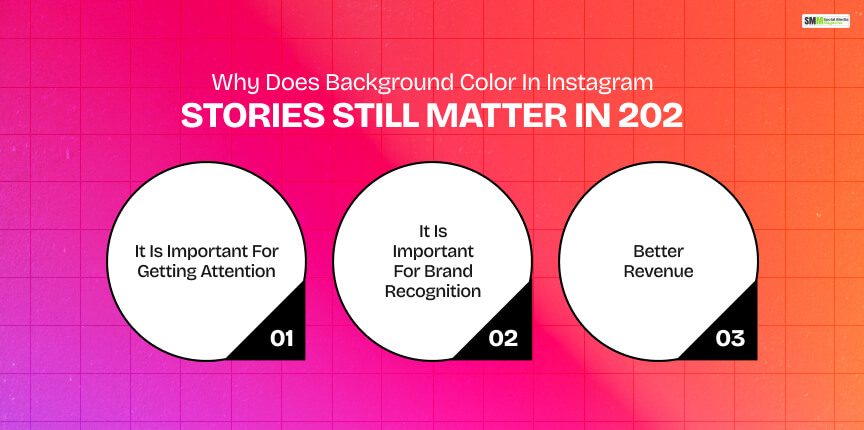
You can call changing the background a basic task. However, data shows why it is a crucial one.
More than 562 million accounts use Instagram Stories every day, according to the Meta Global Platform.
Furthermore, according to Sprout Social’s benchmark data cited by AMRA & ELMA, daily Story viewership is reported at roughly 74.6% of active users.
The same report says that an average viewer watches 8.3 stories per session.
So, you are fighting for attention inside a format people are speed-tapping through. Color is one of the fastest signals you have to stop that thumb.
Color increases brand recognition by up to 80%, according to a widely cited Loyola University Maryland study.
Again, I was going through the Nielsen Visual Identity Report cited by Review42.
It says companies that maintain strict color consistency across seven or more digital and physical touchpoints have seen brand recognition climb by as much as 87%.
Did you ever think that the background color of your Instagram Story will have an impact on your brand revenue?
According to Forbes’ analysis of Lucidpress data, consistent brand presentation across platforms increases revenue by an average of 23%.
Instagram Story backgrounds are a small canvas.
However, they are one of the highest-frequency brand touchpoints a business has.
Most brands post to Stories daily, which means the color choice repeats far more often than a logo redesign ever will.

Adam Mosseri has not specifically commented on colors in Instagram Story background colors.
However, we can get an idea about the platform’s direction from his public commentary.
In his year-end 2025 memo, reported by Newsweek, Mosseri warned that the internet is heading toward “a world of infinite synthetic content. ”
So, authenticity itself is becoming infinitely reproducible.
He has also been consistent about ranking signals.
Across 2025 and 2026, Mosseri has repeatedly emphasized that shares, not likes or comments, are the most important signal the algorithm weighs.
It is a pattern tracked closely by creator-focused outlets like Socialync.
Put those two threads together, and the implication for Stories is straightforward.
A clean, readable, recognizably-yours background helps a viewer instantly register whose content they are looking at.
That supports the kind of quick recognition-and-reshare behavior the algorithm currently rewards.
A muddy, video-covering color block does the opposite. It adds friction at the exact moment you need none.
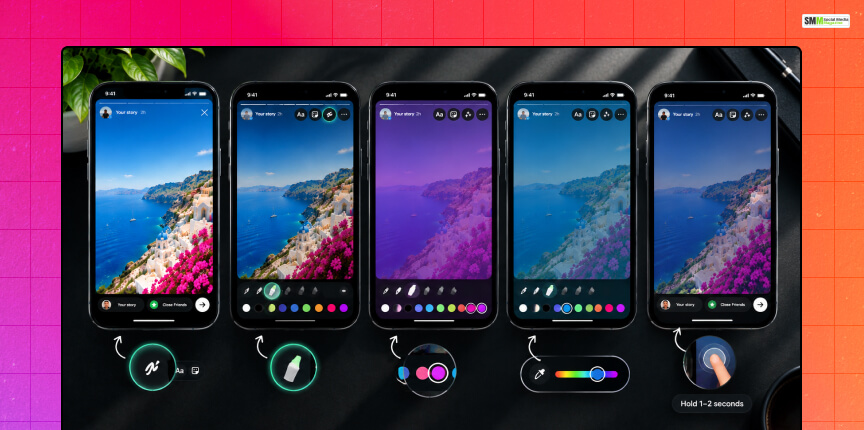
This is the first method I try, and surprisingly, most creators still do not know about this feature.
A solid color fill from the Draw tool covers your video completely.
That is expected behavior, not a bug.
The Highlighter pen is a different tool, and it is translucent by design.
Your video stays fully visible underneath a tinted layer.
However, do not forget these refinements that make the look intentional and not accidental.
A straight solid-pen fill will cover your video.
That is the tool working as intended, not a glitch.
If you want the visual weight of a solid color but still need the video visible, the Highlighter method above is the more reliable route.
Reserve the full solid fill for text-only or graphic Stories where there is no footage underneath to protect.
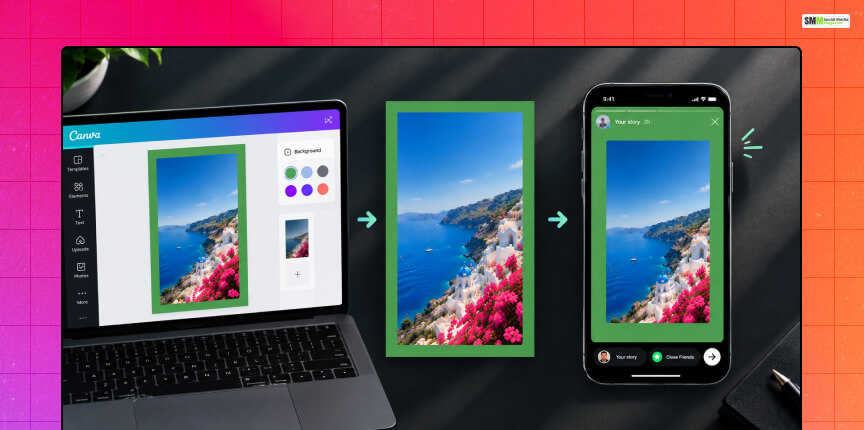
Instagram’s in-app resizing behavior is not consistent across every account.
So, building the frame externally is the dependable option irrespective of the version of the app you are on.
Canvas size: 1080 × 1920 pixels (9:16), Instagram’s standard Story dimension.
| Step | What to do |
|---|---|
| 1 | Create a new 1080×1920 project in Canva, Adobe Express, or CapCut. |
| 2 | Set the canvas background to your brand color. |
| 3 | Import your video and then scale the video down to leave a visible border. |
| 4 | Place text, logo, or stickers in the vacant border space. |
| 5 | Export the file as MP4 and upload the finished file directly to Stories. |
You are uploading a completed layout rather than layering elements live inside the app.
So, there is no risk of Instagram’s editor clipping or misplacing anything.
Have you ever tried to separate the elements you see in a high-performing creator and Brand story?
It has a polished or designed look that comes from a centered video and a color frame around it.
Also, there will be captions and link stickers in the border.
You cannot create this border inside the Instagram app. So, you have to build it outside and then upload the finished file to Instagram.
Use tools such as InShot, CapCut, or Canva for building a clean color border around your video.
You cannot create gradient backgrounds for your Instagram Story using the native Draw tool.
The workaround is the same canvas-first approach used for solid borders.
You have to just swap the flat background for a gradient fill in your design tool of choice.
A rule I give every client.
The gradients have to be subtle when there is video sitting on top of them.
Also, save bold, saturated gradients for text-only or announcement-style frames where nothing needs to stay legible underneath.
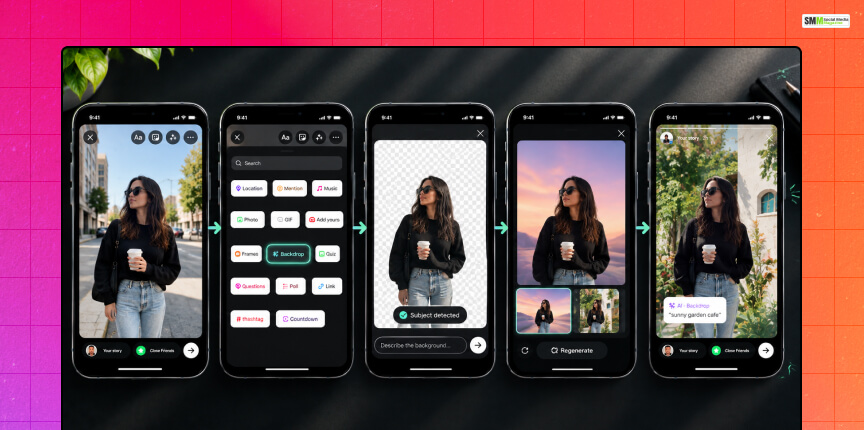
This is the update most “how to change your Story background color” brands have caught up to yet.
Instagram now ships a generative-AI tool called Backdrop.
It does something the manual methods above cannot.
It replaces the entire background behind your subject with an AI-generated scene or color environment, not just a flat tint.
When sharing a photo with Backdrop, viewers can tap a “Try it” sticker that carries your prompt.
It lets them recreate the same background on their own Story.
Instagram labels these Stories with an AI·Backdrop tag along with the original prompt in quotation marks.
As documented when the feature rolled out in 2023, it is worth knowing if brand transparency or platform-manipulation policies are part of your content review process.
Rollout has historically been staged rather than universal.
So, don’t be surprised if it’s not on every team member’s account yet.
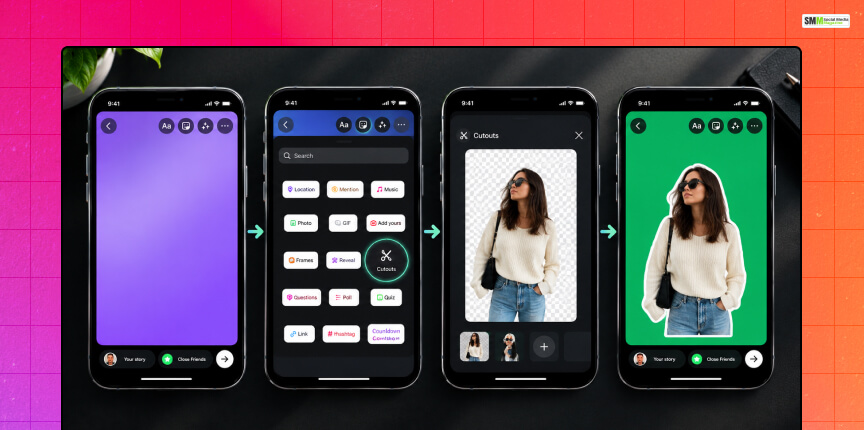
If your actual goal is the reverse of Backdrop, keep your subject sharp while controlling everything around it manually.
Cutouts is the tool for this task.
Meta describes Cutouts as a way to “transform even your most casual, everyday moments into something unique to share with your friends.”
It further adds,
“Once you create your cutouts, they are saved and easily accessible in your sticker tray, so you can come back to them time and time again.
You can even let others save and reuse the cutout stickers you created in their reels and stories.”
The result is a layered look.
Your video has a bold background color and a sharp subject on top without touching an external editor.
However, the availability of this tool can vary by account and app version.
So, if Cutouts is not showing up yet, the canvas-first method in Method 3 gets you the same visual outcome.
| Method | Best for | Video stays visible? | Built-in app? |
|---|---|---|---|
| Highlighter fill | Quick, on-brand tint over existing footage | Yes | Yes |
| Solid pen fill | Text-only or graphic Stories | No | Yes |
| Canvas-first border | Polished, framed creator/brand look | Yes | No (Canva/Adobe Express/CapCut, then upload) |
| Gradient canvas | Announcement or mood-driven Stories | Depends on layout | No |
| AI Backdrop | Full scene replacement, not just color | N/A (photo-based) | Yes |
| Cutouts | Keeping one subject sharp on a bold color field | Yes (subject only) | Yes |
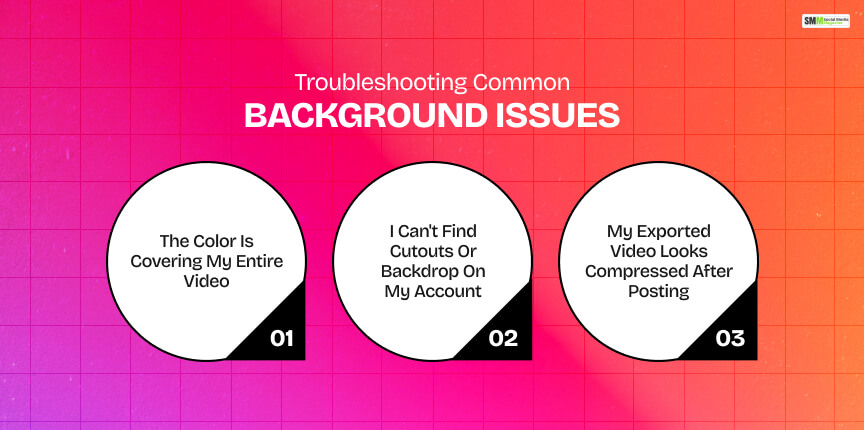
If you encounter these common problems regarding how to change the background color on an Instagram Story, here are the quick solutions.
You likely used the solid pen fill instead of the Highlighter. Switch pens, and the Highlighter is translucent by design, unlike the Solid pen.
Feature rollouts on Instagram are routinely staggered by account, region, and app version.
If a tool is not visible yet, updating the app is the first fix.
If it still is not there, the canvas-first method (Method 3) gets you a comparable result without waiting on the rollout.
Instagram compresses all uploaded Story content.
Exporting at the correct native dimension,1080 × 192, before uploading minimizes visible quality loss.
It leaves little room for Instagram to resize your file.
Background color should support your message, not compete with it.
Outfame has conducted an analysis that says accounts with higher story engagement received 1.6 times more profile visits.
So, small legibility and consistency choices compound.
A background that reads clearly and matches your other content is doing quiet retention work every time it is posted.

Sibashree has been into SEO and eCommerce content writing for more than 9 years. She loves reading books and is a huge fan of those over-the-top period dramas. Her favorite niches are fashion, lifestyle, beauty, traveling, relationships, women's interests, and movies. The strength of her writing lies in thorough research backing and an understanding of readers’ pain points.