
How Long Can A Reel Be On Instagram In 2026? What 10 Years On This Platform Has Taught Me?
sibashree bhattacharya, 18 hours ago

Today’s topic: How to see WhatsApp status without seen?
WhatsApp is perhaps the most popular medium for texting in 2025. While WhatsApp started as an online private messaging app, it has evolved into a space where you can put up photos, share reels on your status, and even add music, but instead of allowing everyone to see your updates, only your contacts can get a glimpse of your personal life.
But you know the most underrated thing about WhatsApp? You can hide your ‘active’ status, you can mute people you don’t want to receive notifications from, and you can also check status updates without letting the other person know!
I love how WhatsApp does so much to protect our privacy! And while Instagram used to be my favorite social media platform, I’ve fallen hard for WhatsApp, thanks to its end-to-end encryption and privacy settings.
On that note, today, I will teach you how to see WhatsApp status without seen – yeah, after you are done reading this blog, you can check out the status of others on the app without them finding out.
Interesting, right?
Stay tuned!

So, here I am going to break down how to see WhatsApp status without seen. The best part? I have four methods to do this, so if you think method 1 is not ideal for you or is not working out well, you can always opt for method 2, 3, or even 4.
Let’s get started, shall we?
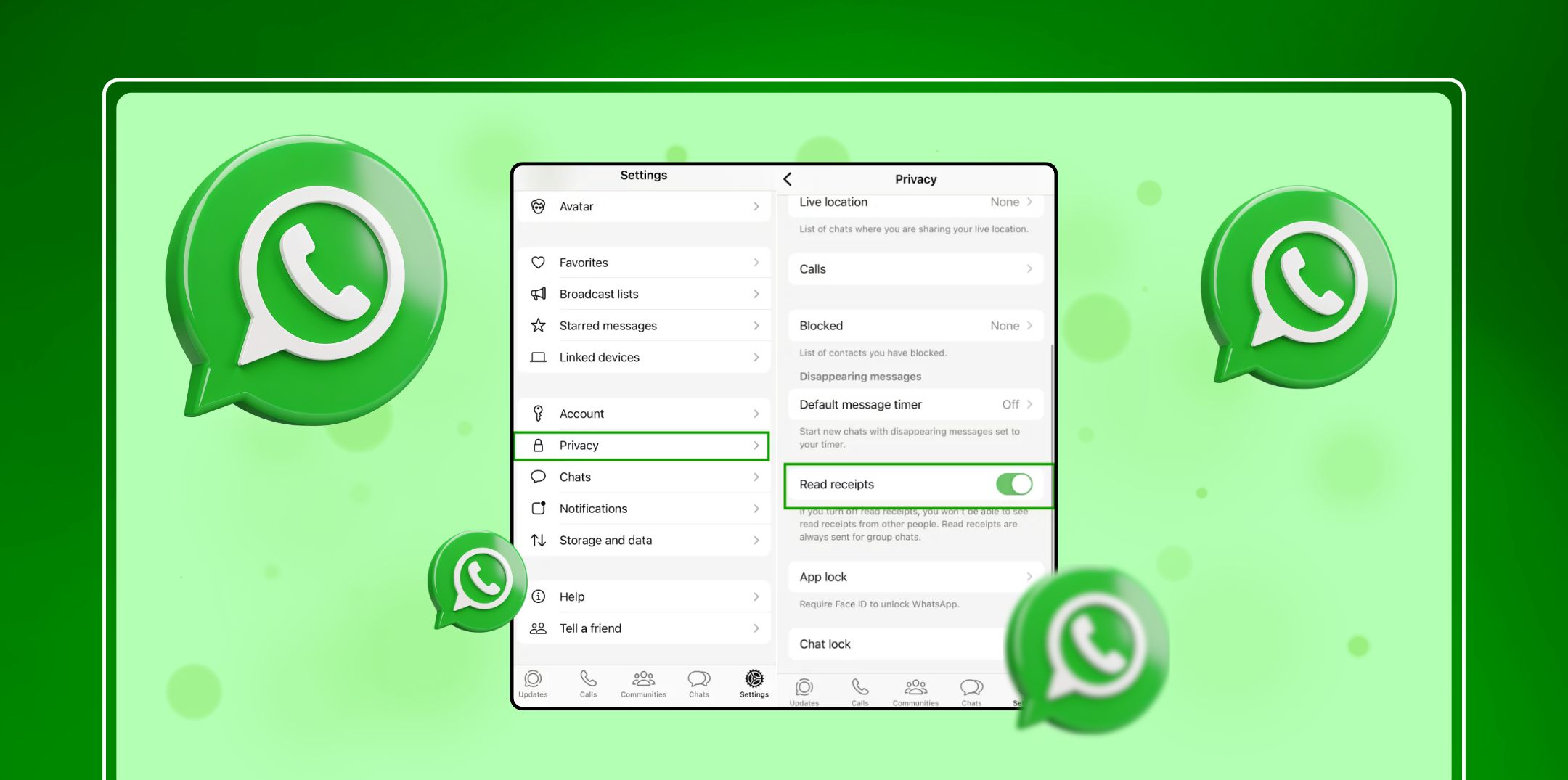
If you want to check WhatsApp statuses secretly, just disable your read receipts. As a result, the app will hide your WhatsApp status views directly, keeping others from finding out that you have gone through their texts.
In order to turn off your read receipts on WhatsApp, access the app’s Settings and disable the option marked ‘Read Receipts.’ Also, while doing so, remember that this privacy setting works both ways: Just like others won’t know when you see their status, you won’t find out either when people see your status.
Yep, it’s a two-way street! While you can stay hidden, you will not know when someone reads your messages.
An extra technique for viewing the status of a contact discreetly includes accessing the same while staying offline. So, here’s a detailed guide on how to execute this step subtly:
As a result, it is imperative to understand that timing is vital for the effectiveness of this method. It actually works really well when you can execute this promptly right after someone updates their status. So, this is precisely how you can check out someone’s status on WhatsApp without getting seen.
KidsGuard, StatusSaver, and GBWhatsApp are three of the best third-party apps in the market currently that allow users to privately view the status of contacts on their WhatsApp. The best part? These apps also come with additional functionality – it is more than what the official app of WhatsApp can offer!
However, while using any third-party app for discreetly viewing someone’s WhatsApp status, here are certain things to keep in mind:

To view status updates discreetly, one can easily explore the hidden status folder of WhatsApp. It is an indirect way of checking out updates. On that note, here’s a guide:
So, you will see that this method will allow you to browse through the status updates of your contacts without directly opening them. Also, remember that the universality of this approach can be somewhat limited, thanks to the file structure and device variations of WhatsApp.
Although it is possible to view someone’s WhatsApp status without letting them know about it, it is important to execute these methods with caution. Moreover, while doing so, always make your privacy a priority.
Also, you will see that WhatsApp makes transparent communication a priority – it is a primary goal of the app. So, ensure that you are using the official features of the app responsibly. Also, if you are delving into any alternative method, ensure it is for a legitimate purpose.
In addition, you will see that using any third-party app involves certain inherent risks. This includes violating WhatsApp’s privacy terms and compromising the security of data. As a result, before you use any third-party app, ensure that you assess its absolute necessity and, more importantly, the potential consequences of the same.
Plus, it is best to maintain certain ethical standards and privacy while interacting on any messaging app, be it WhatsApp or something else.
After all, evaluating the standard need and understanding the different potential risks from before is ideal for ensuring the secure and responsive use of alternative methods.
Also Read:

Barsha is a seasoned digital marketing writer with a focus on SEO, content marketing, and conversion-driven copy. With 8+ years of experience in crafting high-performing content for startups, agencies, and established brands, Barsha brings strategic insight and storytelling together to drive online growth. When not writing, Barsha spends time obsessing over conspiracy theories, the latest Google algorithm changes, and content trends.

sibashree bhattacharya, 18 hours ago

Subham Kamila, 19 hours ago

sibashree bhattacharya, 22 hours ago